

Defined Objectives
Frame each agent workflow around an agreed task objective and completion criteria.
Custom AI Agent Systems
ASFIT Solutions develops custom AI agent systems for defined objectives, multi-step tasks, approved business information, connected tools, and controlled actions with human oversight where required.
Goal-Directed Execution Engines
Unlike standard question-and-answer experiences, a custom AI agent can evaluate a defined objective, gather approved task context, select a permitted next step, and carry out structured actions within agreed controls.
Frame each agent workflow around an agreed task objective and completion criteria.
Assemble approved business information and authorized records required for the task.
Use supported tools and APIs within the agreed operational scope.
Pause sensitive, uncertain, or exceptional cases for authorized staff review.
Target Operational Scenarios
Select an operational category to explore how custom AI agents can support defined business tasks.
Teams managing complex, multi-step administrative or routing tasks that require context review and supported system updates.
Businesses coordinating enquiries, records, documents, staff actions, and client follow-up across defined operational workflows.
Teams that need controlled task processing around structured data, approved APIs, internal systems, and reviewable outcomes.
Teams assembling approved sources, summarizing information, preparing drafts, and routing work for human review.
Support operations that need controlled context gathering, task routing, record updates, and escalation paths.
Sales teams coordinating account context, next-step evaluation, CRM actions, and approval-sensitive follow-up.
Organizations where defined tasks move across several compatible tools and need a controlled orchestration layer.
Organizations that need explicit permissions, review checkpoints, activity logging, exception handling, and bounded agent behavior.
Operational Bottleneck Analysis
Routine work can become slow when it depends on repeated context gathering, manual next-step evaluation, and constant movement between business systems.
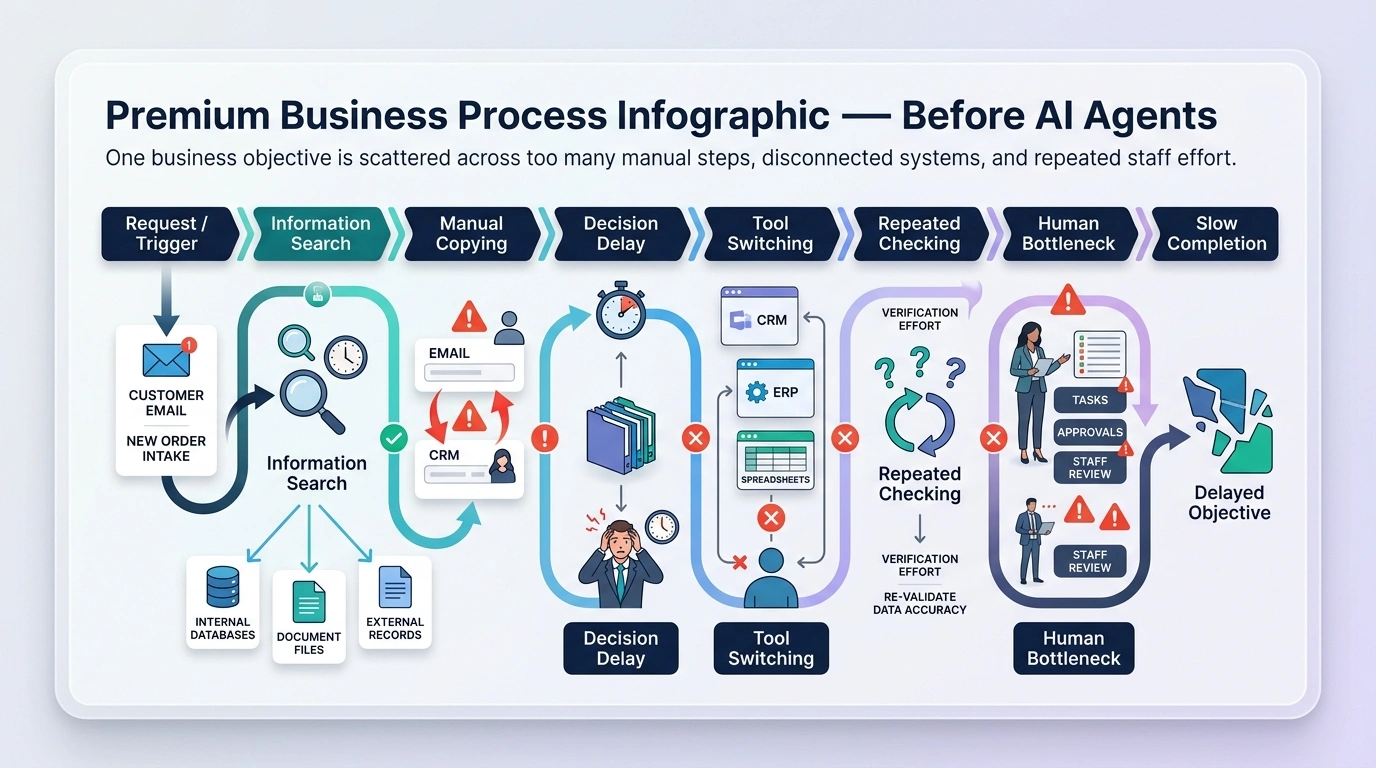
Workflow Comparison
A visual comparison of fragmented manual work and a controlled AI agent workflow.
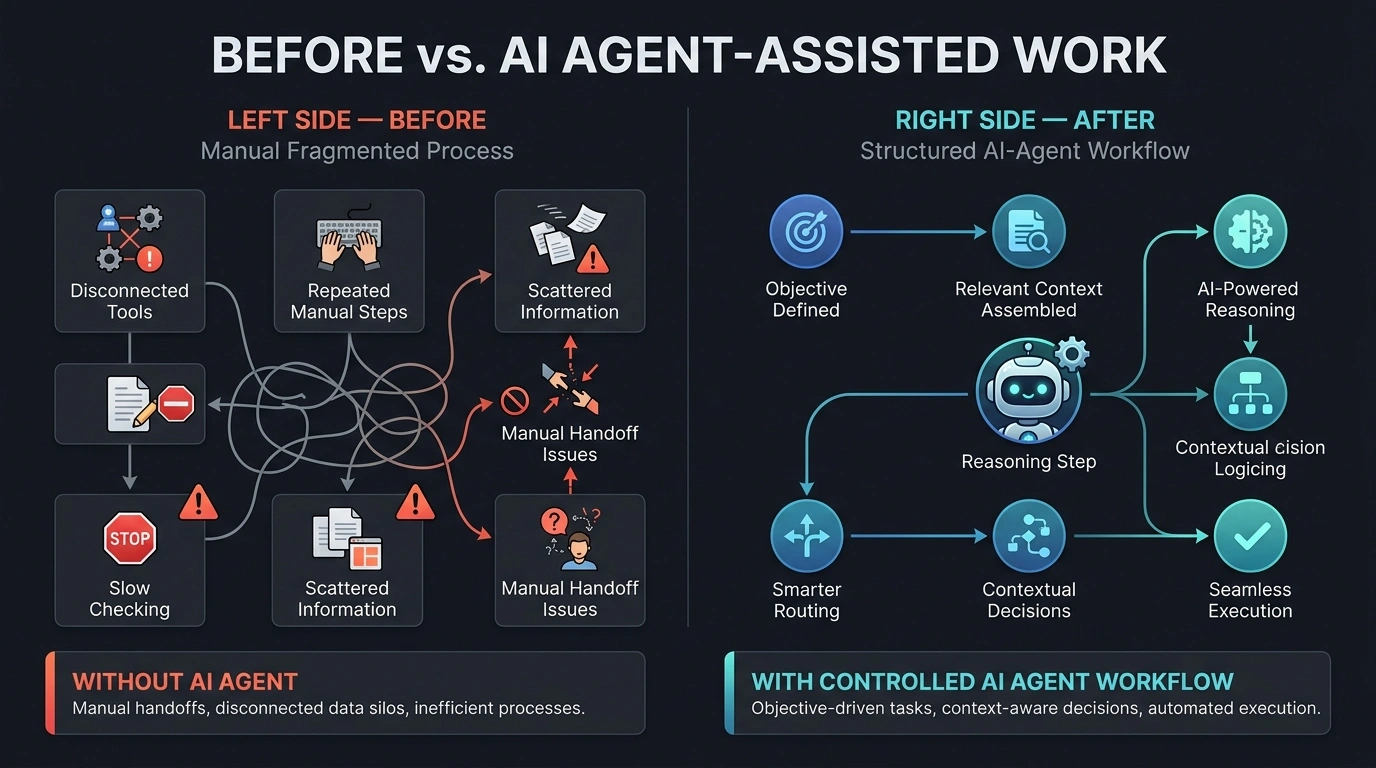
Without an AI Agent
With a Controlled AI Agent Workflow
Modular Capabilities
Capabilities are selected around defined objectives, supported systems, permissions, review requirements, and agreed project scope.
Explicit operational goals and completion criteria frame each supported task.
Relevant approved records, data, notes, and instructions can be assembled where required.
Selected business information and policies can guide supported decisions.
Active stage, inputs, results, and next steps can remain visible where included.
Available options can be evaluated within defined rules before action.
Permitted actions can use configured system endpoints and supported tools.
Secure connections can support compatible internal or third-party web services.
Authorized customer records can be read or updated within the agreed workflow.
Approved files and structured business records can support suitable tasks.
Configured actions can pause for authorized staff review.
Task state, permitted actions, exceptions, and outcomes can be recorded.
Fallback, retry, escalation, and review paths can handle suitable failures.
Available capabilities depend on project requirements, agreed scope, supported platforms, permissions, and access provided.
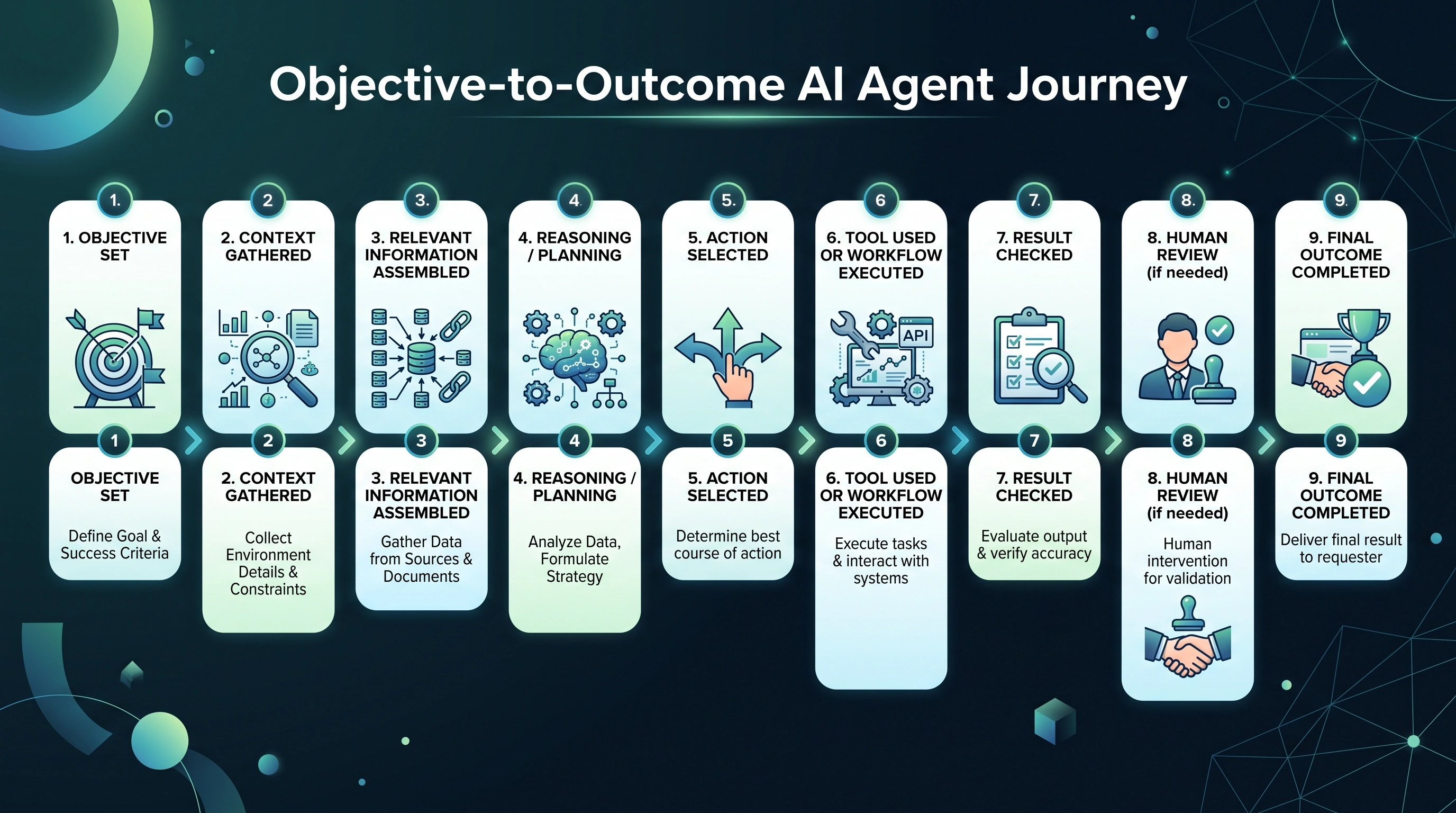
Runtime Lifecycle
A controlled task lifecycle from an agreed objective through approved context, actions, checks, review, and a recorded outcome.
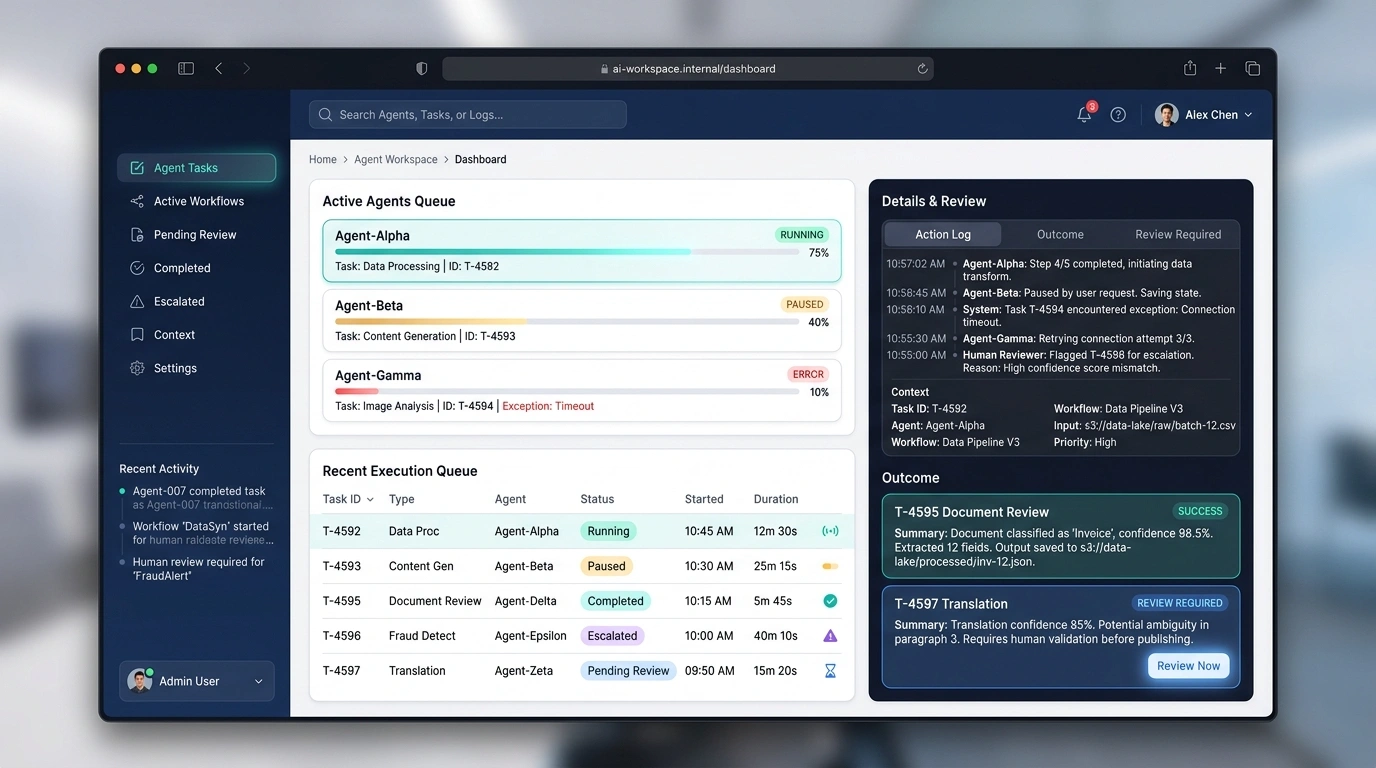
Operational Control
A conceptual workspace can expose task progress, active context, execution stages, pending reviews, and recorded outcomes.
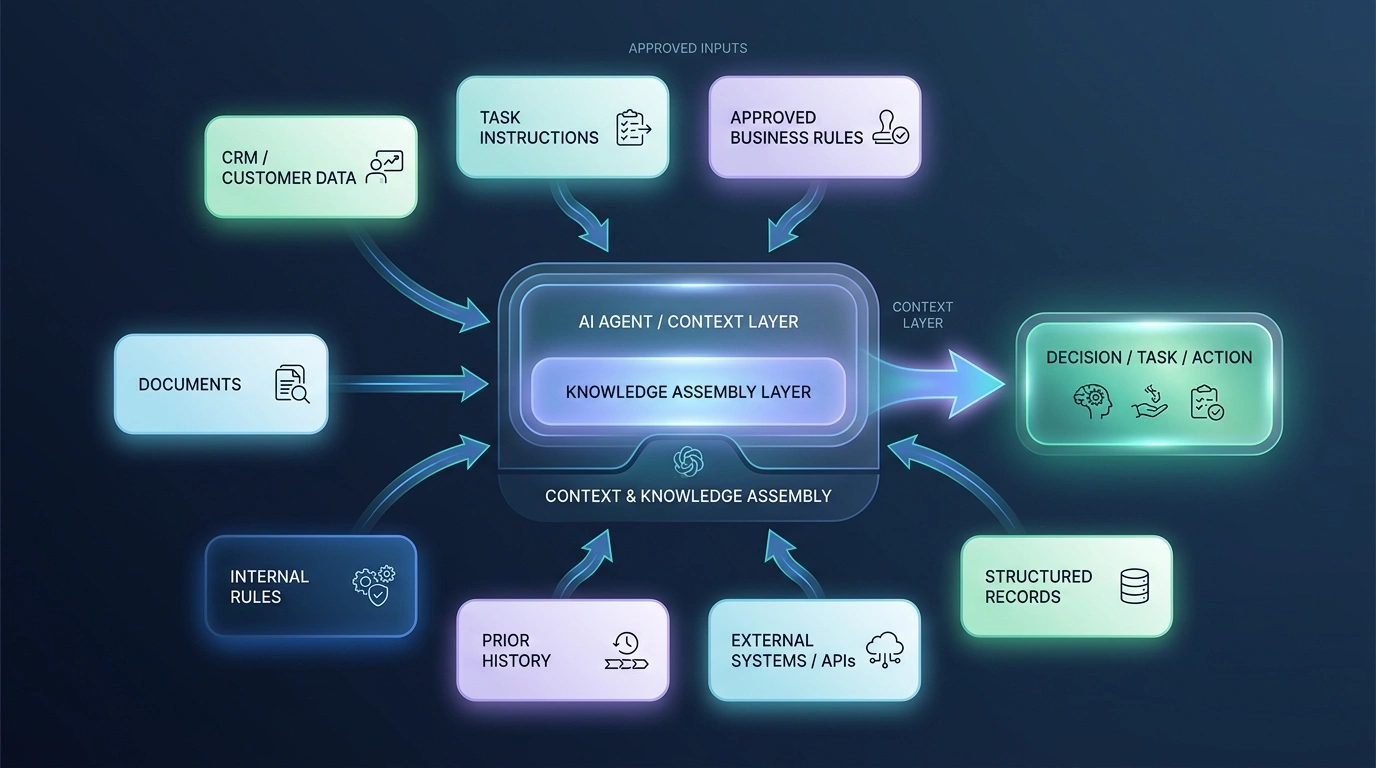
Controlled Data Boundaries
Rather than granting unrestricted access, the agent can be configured to assemble only approved and authorized information relevant to its defined objective.
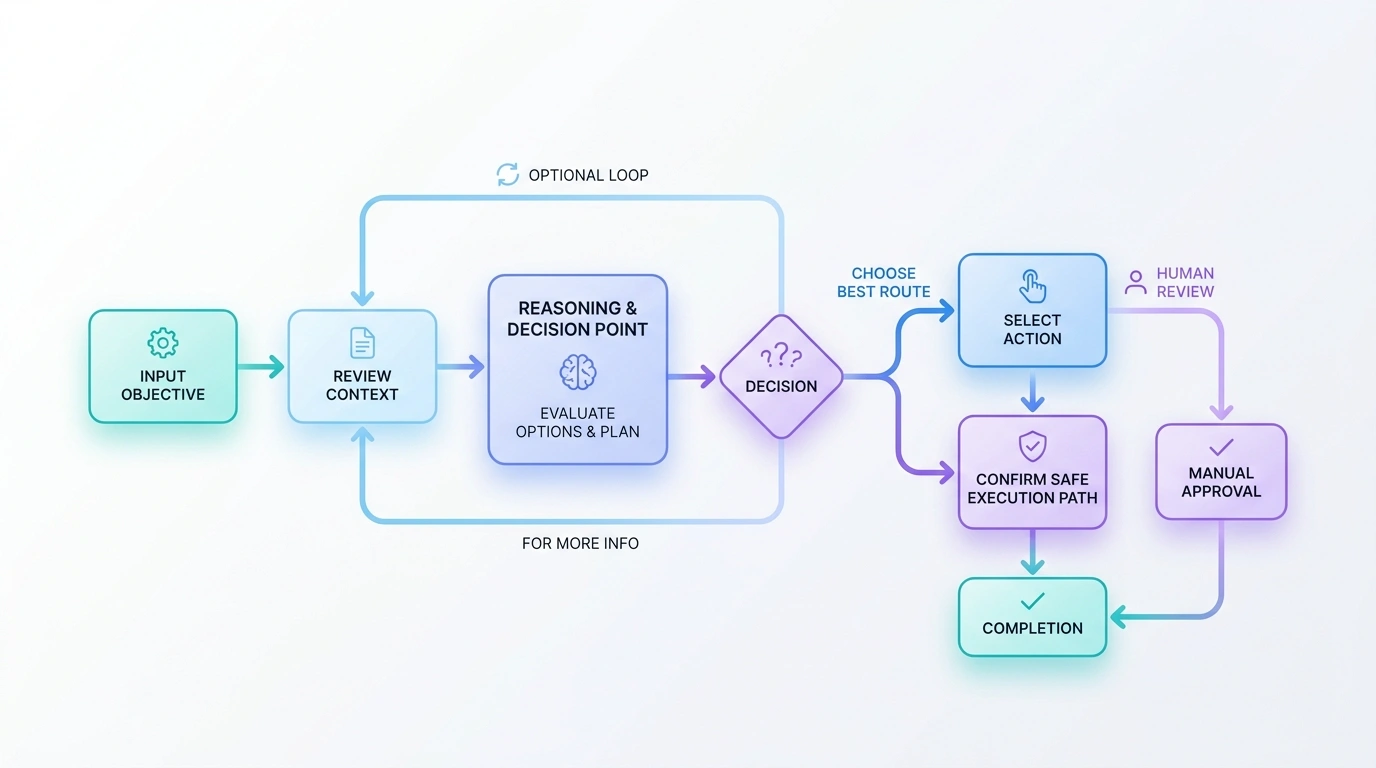
Decision Evaluation
The agent evaluates active task state, assembled information, available tool options, and configured business constraints before selecting an appropriate next step.
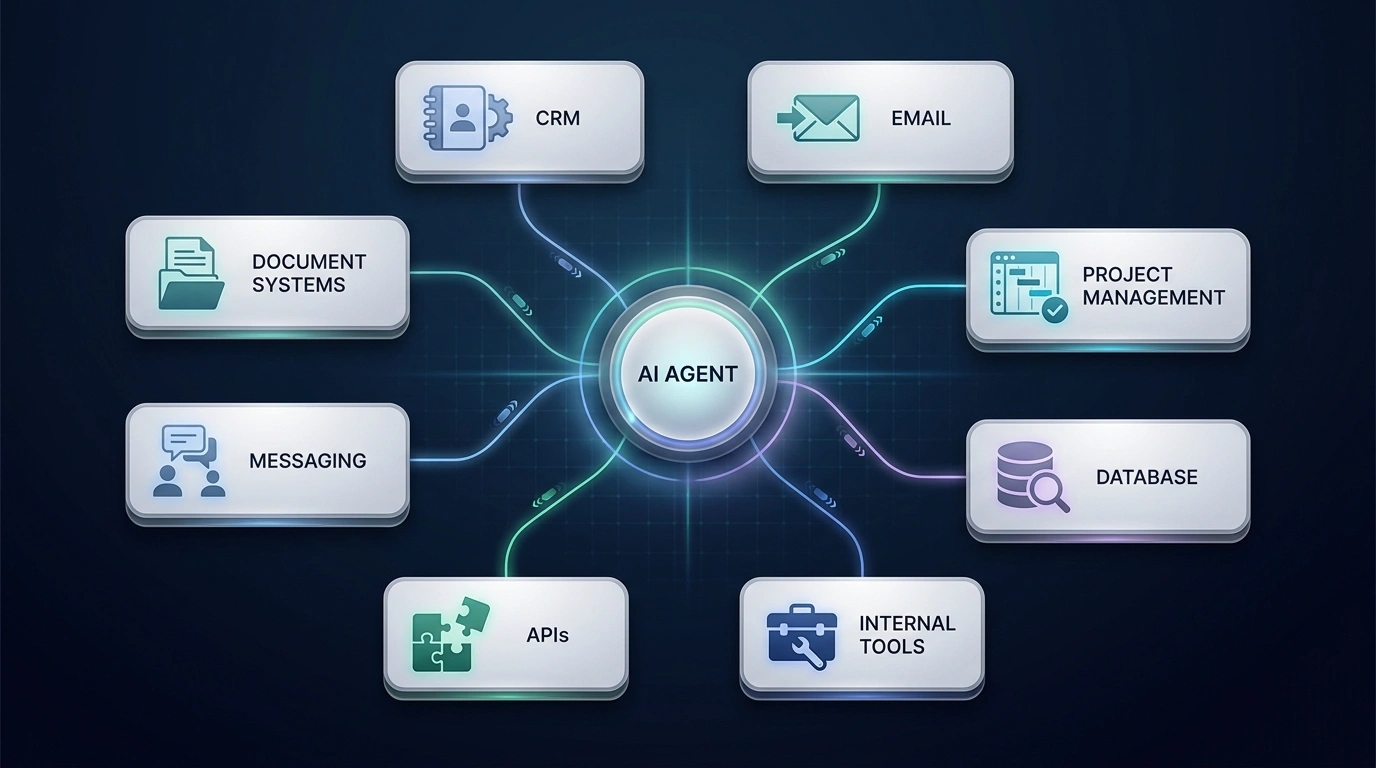
Runtime Execution
When the next step requires an external action, the agent can invoke a pre-approved tool function within strictly defined parameters and permissions.
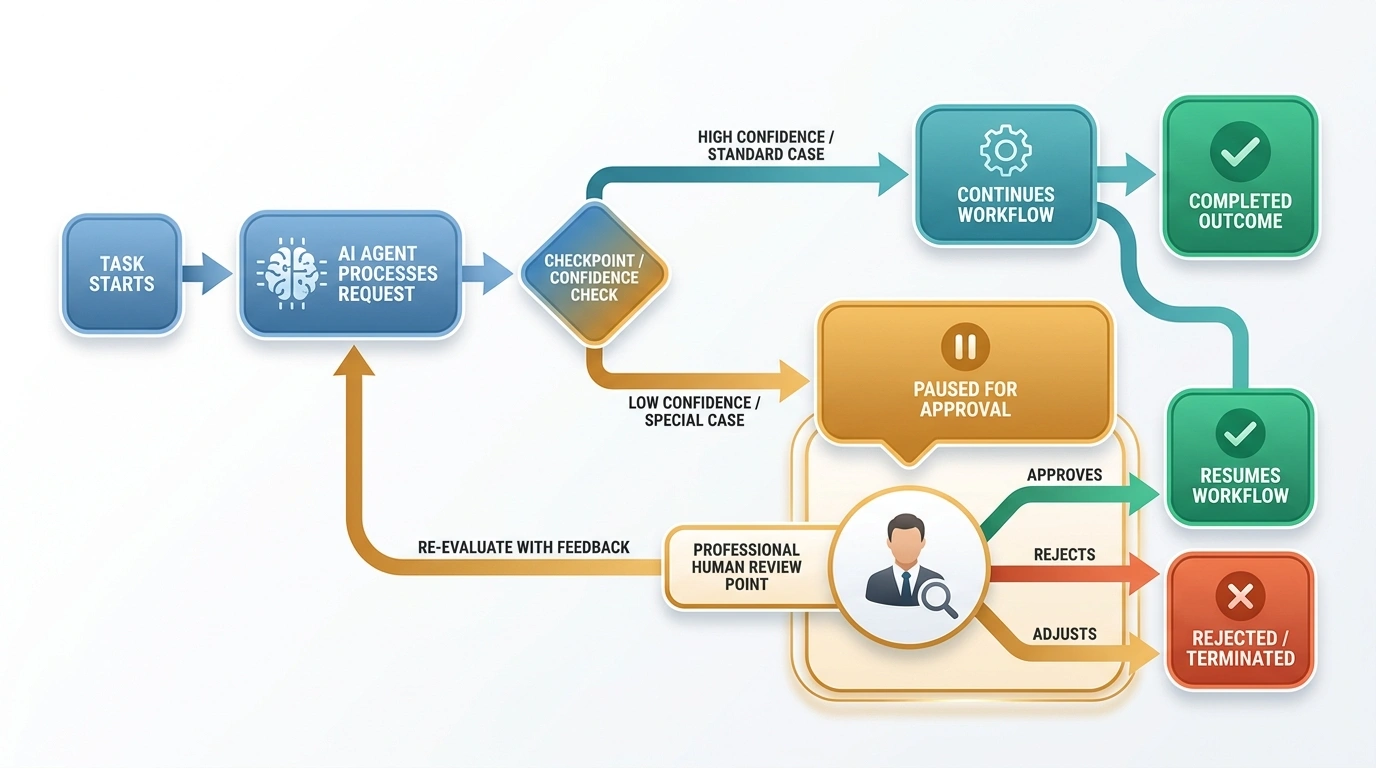
Governance & Trust Safety
Routine permitted actions may proceed automatically, while sensitive actions, unusual conditions, uncertainty, or configured approval rules can pause execution for authorized staff review.
Methodology
A structured development methodology for defining objectives, mapping context, configuring permissions, testing review paths, and refining controlled agent behavior.
Define target tasks, success criteria, operational boundaries, and responsible owners.
Map approved information sources, records, instructions, policies, and access requirements.
Design task state, reasoning boundaries, exception routes, and outcome handling.
Connect supported tools with explicit actions, credentials, and authorization limits.
Configure decision guidance, business rules, checks, and human review conditions.
Validate expected paths, permission limits, failures, exceptions, outputs, and approval routes.
Deploy the approved workflow, monitor practical behavior, and refine agreed controls.
Engineering Standards
Business-friendly controls help keep each agent aligned with defined scope, approved access, review requirements, and supported system boundaries.
Agent behavior remains tied to agreed objectives and operational boundaries.
Tool actions and data access are restricted by configured authorization.
Selected sources guide supported task context and decisions.
Credentials and endpoints are handled through suitable connection controls.
Selected conditions can pause execution for authorized review.
Supported task state, actions, exceptions, and outcomes can be recorded.
Failures can route to bounded retry, fallback, escalation, or review paths.
The workflow can stop safely or request help when it cannot continue appropriately.
Task progress can persist between agreed workflow steps.
Architecture can support compatible APIs, records, and business systems.
Ecosystem Connectivity
Supported connections can let the agent retrieve approved context or perform permitted actions within defined parameters.
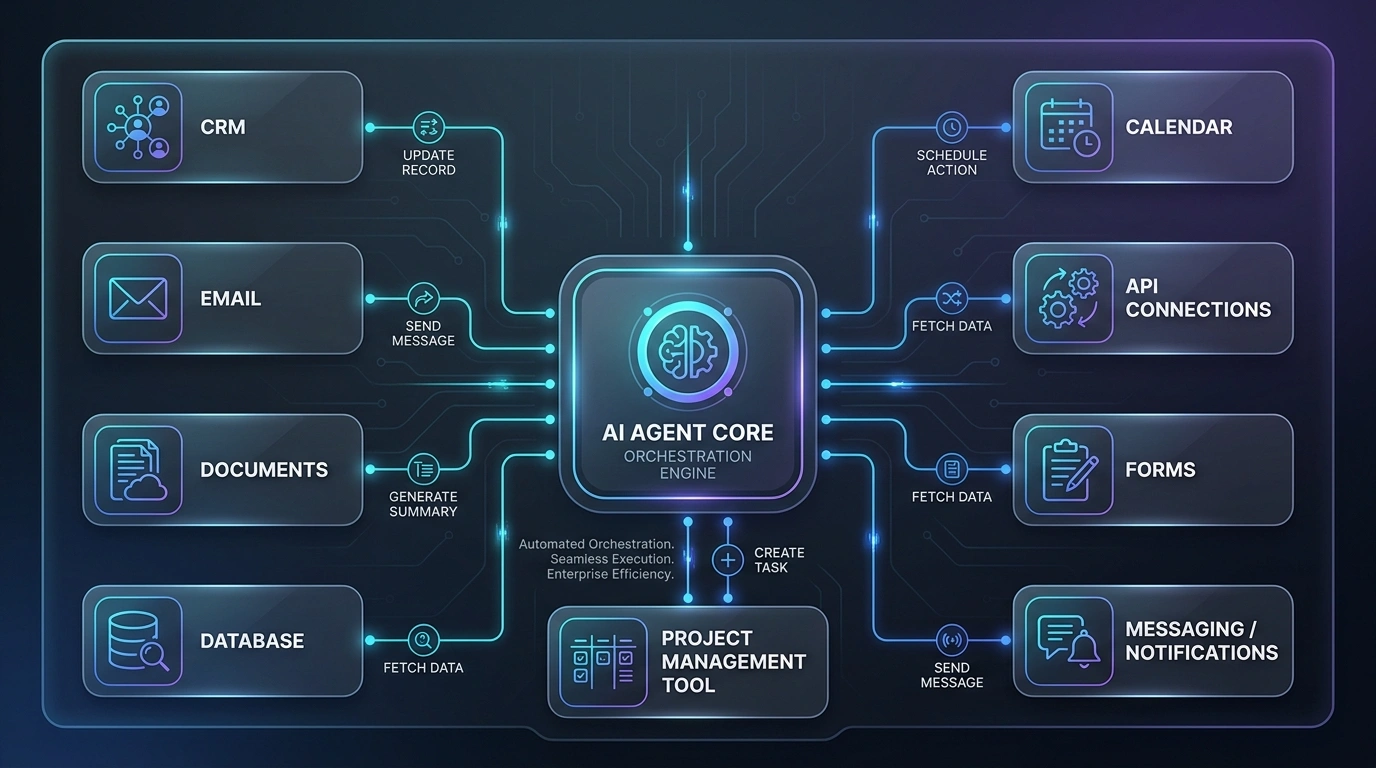
Available integrations depend on project requirements, supported platforms, credentials, permissions, and access provided.
Qualitative Improvements
Qualitative operational shifts that can follow when a controlled agent workflow is designed around defined business tasks.
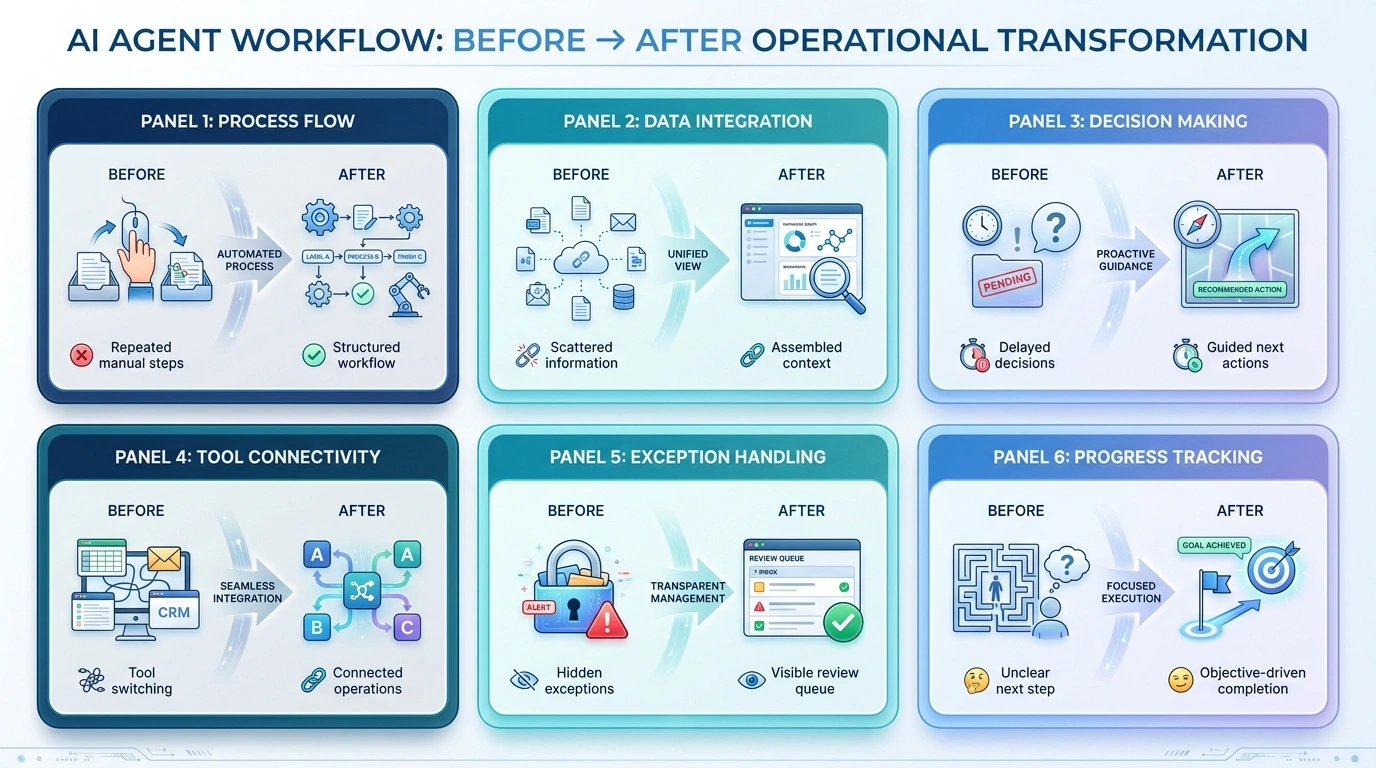
From: Staff manually gathering context
To: Relevant context assembled for the task
From: Repeated next-step decisions
To: Structured next-action evaluation
From: Constant app switching
To: Approved connected tool actions
From: Routine work depending on memory
To: Recorded task state and next steps
From: Exceptions discovered late
To: Clear escalation and review points
From: Unclear activity history
To: Recorded agent actions and outcomes
Complementary Capabilities
These active ASFIT services can support the systems, data, customer workflows, and interfaces surrounding a controlled AI agent.
Questions & Answers
An AI agent is a goal-directed software system configured to review approved task context, evaluate appropriate next steps, use authorized tools, and record outcomes within defined business rules.
A chatbot is primarily designed for conversation and guidance. An AI agent can be configured to carry a defined task through multiple controlled steps and connected actions, with human review where required.
Traditional automation generally follows predetermined rules and paths. An AI agent may also evaluate unstructured context and select among approved next steps, while remaining within configured permissions and review boundaries.
Yes, where supported APIs, credentials, permissions, and technical access are available. Each connection and permitted action is reviewed as part of the agreed project scope.
Only the approved sources and authorized data defined for the task, such as selected CRM records, documents, business policies, forms, or prior interaction history where included.
Yes. The project can define tool permissions, allowed actions, business rules, approval thresholds, fallback behavior, and actions that must never run automatically.
Yes. Sensitive actions, uncertainty, unusual values, selected thresholds, or configured exceptions can pause the workflow for authorized staff review.
Task state, supported tool actions, outcomes, errors, and review decisions can be logged where included, subject to appropriate access and data-handling requirements.
The architecture can support additional approved tasks, context sources, tools, rules, or review paths when compatible with the existing system and agreed as further scope.
Share the business objective, current manual steps, information sources, systems involved, actions that may be permitted, and decisions that require staff review. ASFIT will assess the workflow and recommend a practical scope.
Start Your AI Agent Project
Share your team's multi-step tasks, systems, and control requirements with ASFIT Solutions. We will review the workflow and design a custom AI agent architecture built around your rules.


