

Connected Inputs
Information enters from agreed sources such as website forms, CRM records, email, or supported tools.
AI Business Automation & Workflow Systems
Repetitive copying, checking, routing, updating, and notifying can consume staff time and make simple processes dependent on manual handling. ASFIT Solutions designs structured automation workflows connecting agreed systems, business rules, AI-assisted processing, and human review.
Direct Business Summary
A well-designed automation connects repeatable tasks into a controlled sequence instead of asking staff to manually repeat the same operational steps every time.
Information enters from agreed sources such as website forms, CRM records, email, or supported tools.
The workflow evaluates agreed conditions, with AI-assisted understanding included where useful.
Appropriate actions are triggered such as record updates, routing, task creation, or notifications.
Sensitive decisions, exceptions, and unusual cases can pause for staff review.
Target Audience
Structured workflow automation is most useful when operational tasks repeatedly move between staff, systems, and decision points.
Consulting firms and service teams where enquiries, scheduling, customer details, and follow-ups repeatedly move between staff and multiple business applications.
Store operations coordinating supported order, inventory, notification, and exception workflows across compatible systems.
Teams that need incoming enquiries checked, recorded, routed, and followed up through a more consistent process.
Agencies coordinating recurring client requests, handoffs, approvals, notifications, and project administration.
Support teams routing requests, creating tasks, updating records, and escalating exceptions to suitable staff.
Teams repeating document, data-entry, scheduling, status, and notification steps across day-to-day operations.
Organizations moving the same information between supported forms, email, CRM, spreadsheets, and other business tools.
Processes that repeatedly validate, format, route, update, or summarize information using agreed rules.
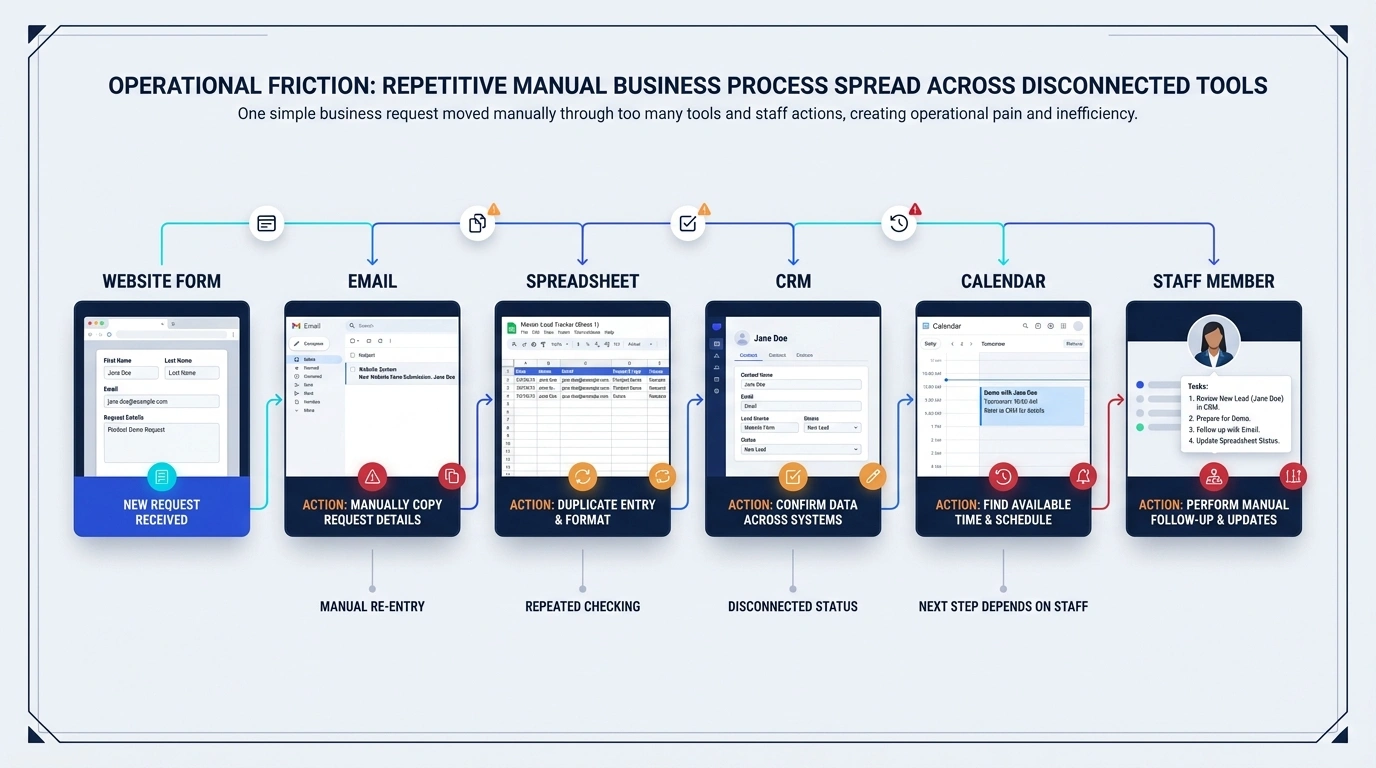
Operational Friction
A process can look simple from the outside while staff repeatedly copy information, check multiple systems, and update records.
Workflow Comparison
Comparing a repetitive manual process with a structured workflow moving through defined rules and supported system connections.
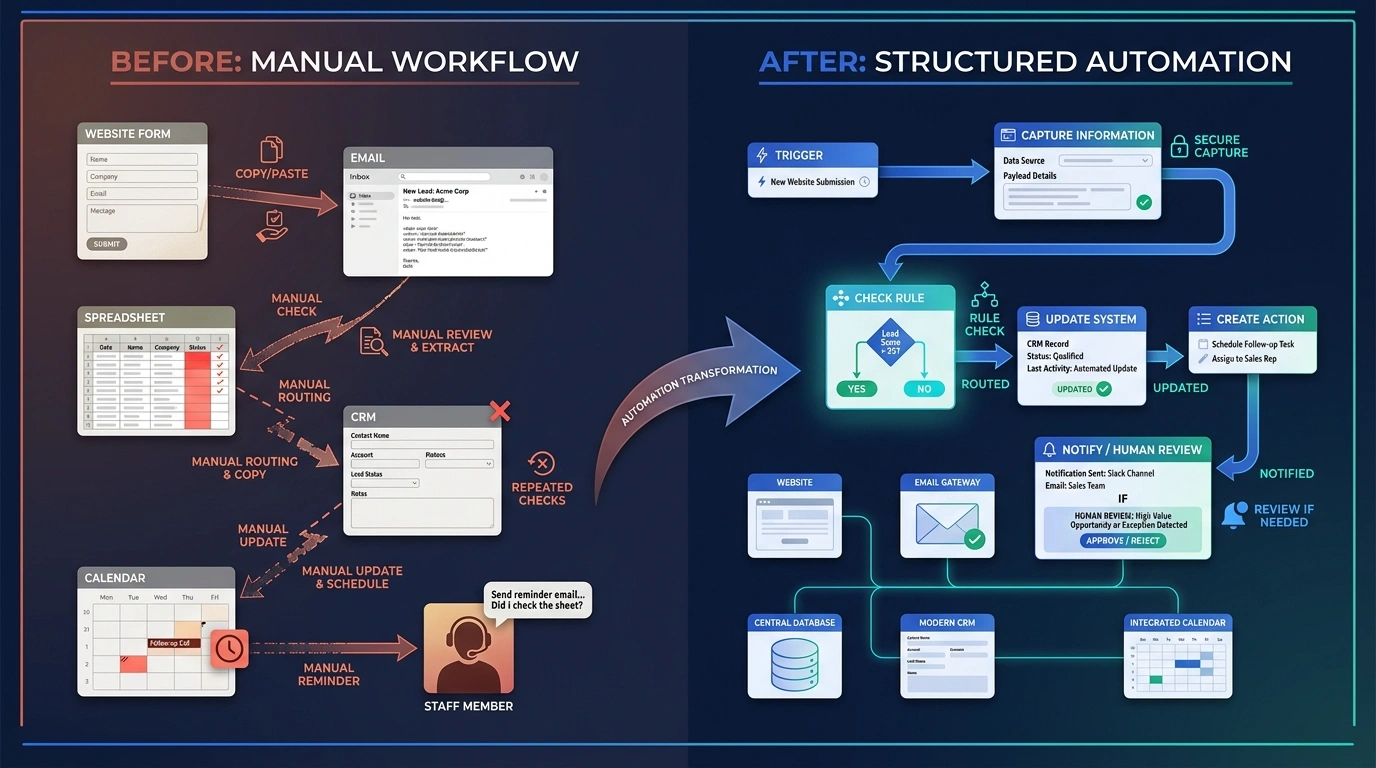
Without Workflow Automation
Staff repeatedly re-enters data, conditions are checked manually, tasks are routed manually, and notifications depend on memory.With a Structured Automation Workflow
Information enters once, agreed rules determine next steps, supported systems update, and exceptions trigger staff review.Capability Breakdown
Capabilities are selected around your specific business processes, supported tools, and project scope.
Agreed events from forms, email, CRM records, schedules, or webhooks can start a workflow.
Extract and format suitable incoming form data for connected workflow steps.
Parse supported email content and route appropriate operational actions.
Create or update supported records, stages, notes, or tasks where included.
Route tasks or records to suitable departments using agreed business logic.
Evaluate agreed conditions so different scenarios follow different paths.
Classify or summarize unstructured information where the use case is suitable.
Extract structured information from suitable incoming documents where included.
Trigger supported staff alerts when selected workflow conditions occur.
Create agreed follow-up tasks or project steps in compatible systems.
Connect custom applications and supported third-party software endpoints.
Pause selected actions for authorized staff review when required.
Available capabilities depend on project requirements, supported platforms, and agreed scope.
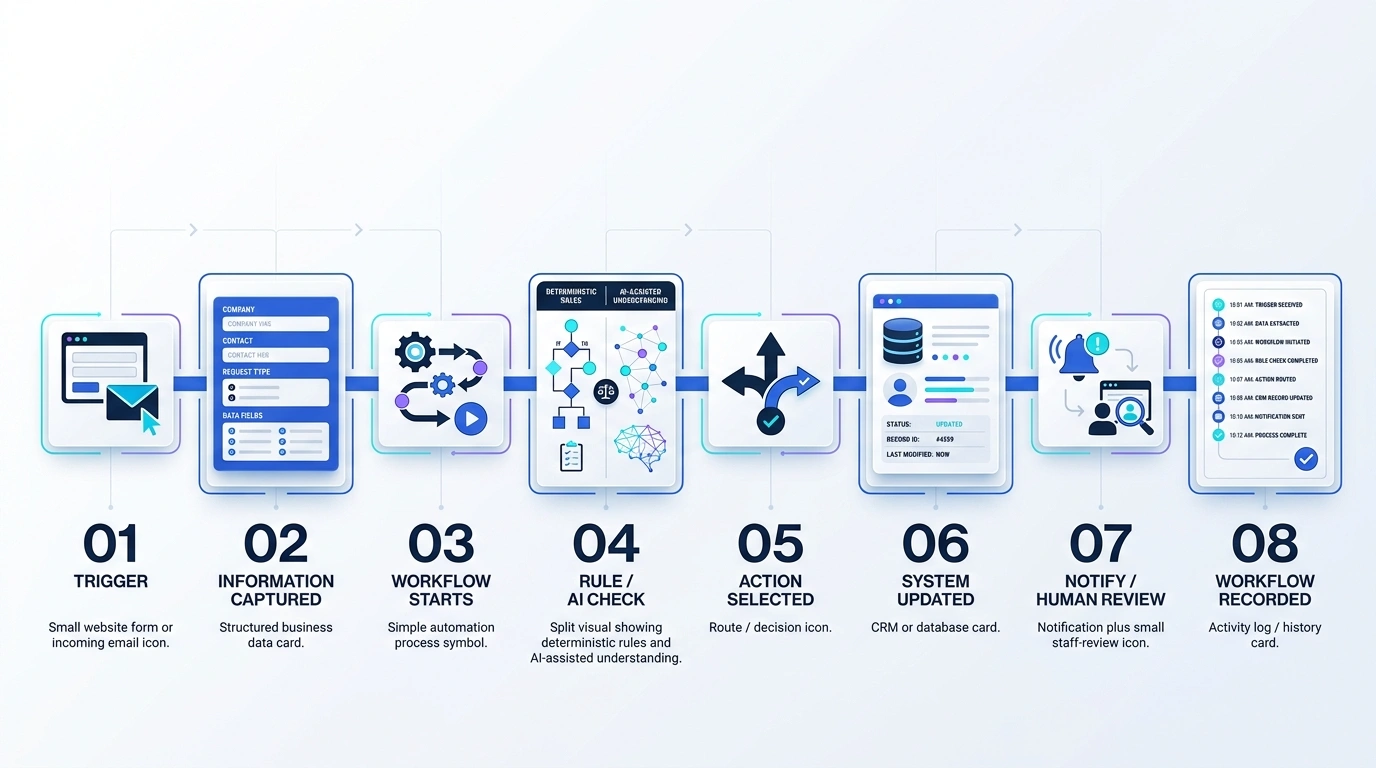
Workflow Lifecycle
How an operational event moves through processing rules, system updates, human review where needed, and a recorded outcome.
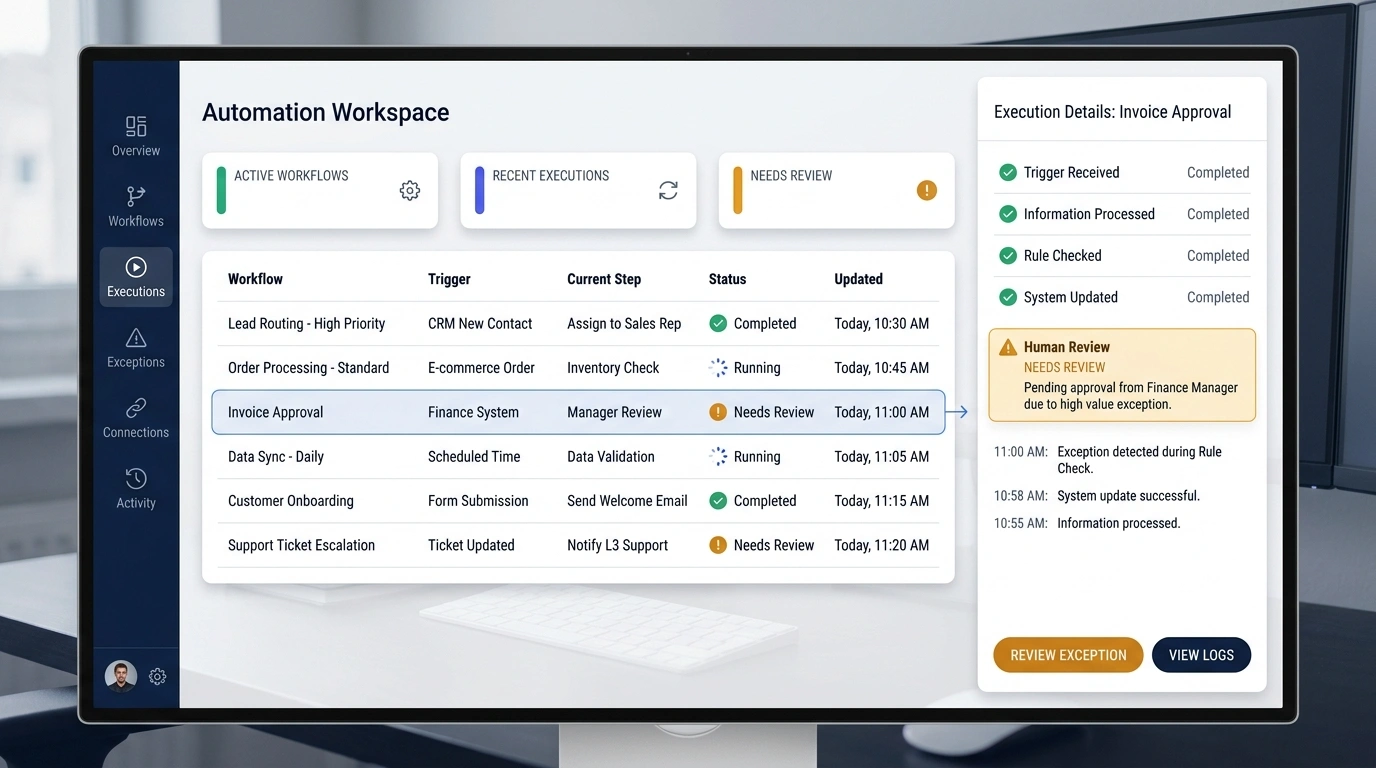
Workspace Visibility
A structured automation system exposes active executions, completed actions, and items waiting for review.
Targeted Intelligence
AI can classify or summarize incoming information, while deterministic business rules control system actions.
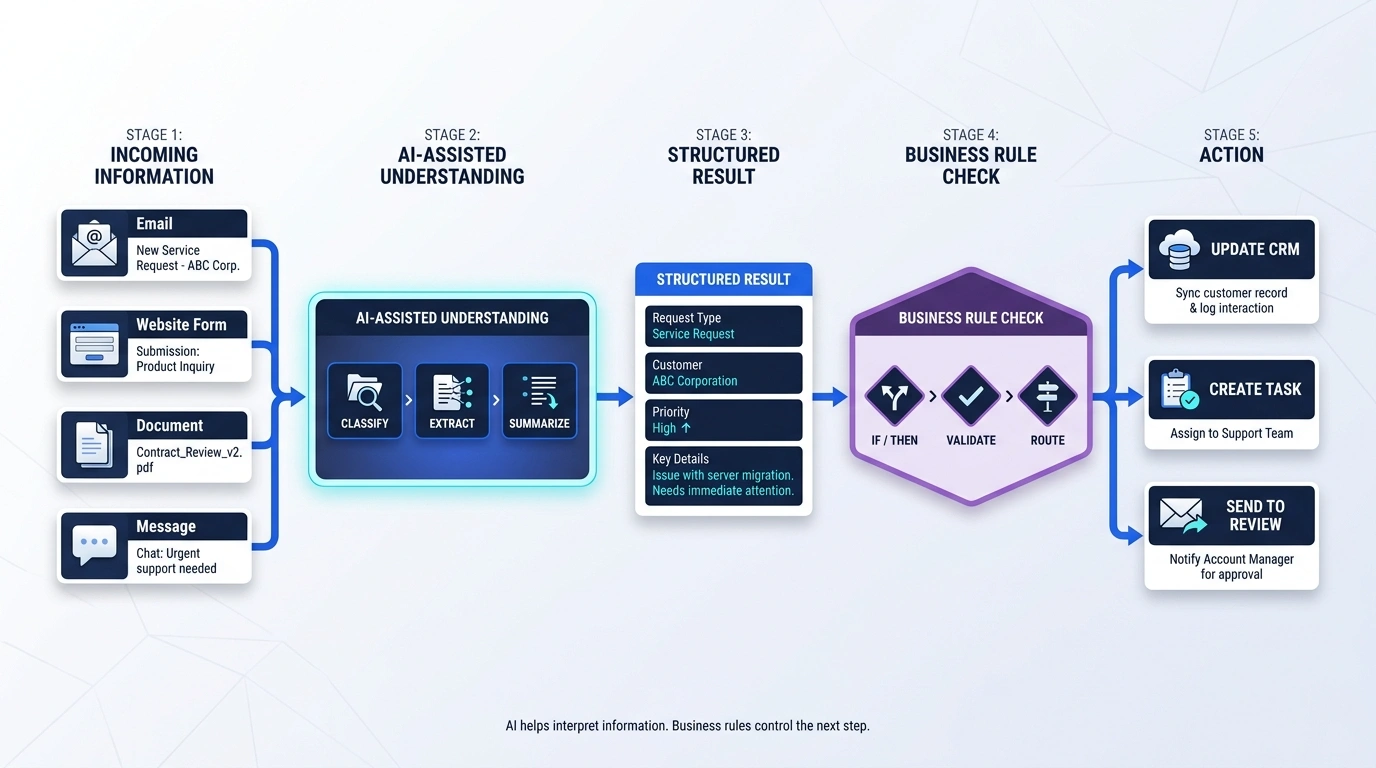
When unstructured text or complex emails enter the workflow, AI can classify the request type or summarize key details. Once formatted into structured data, agreed business rules govern the next system action.
Decision Logic
Workflows evaluate conditions so standard requests move automatically while special cases route to appropriate actions.
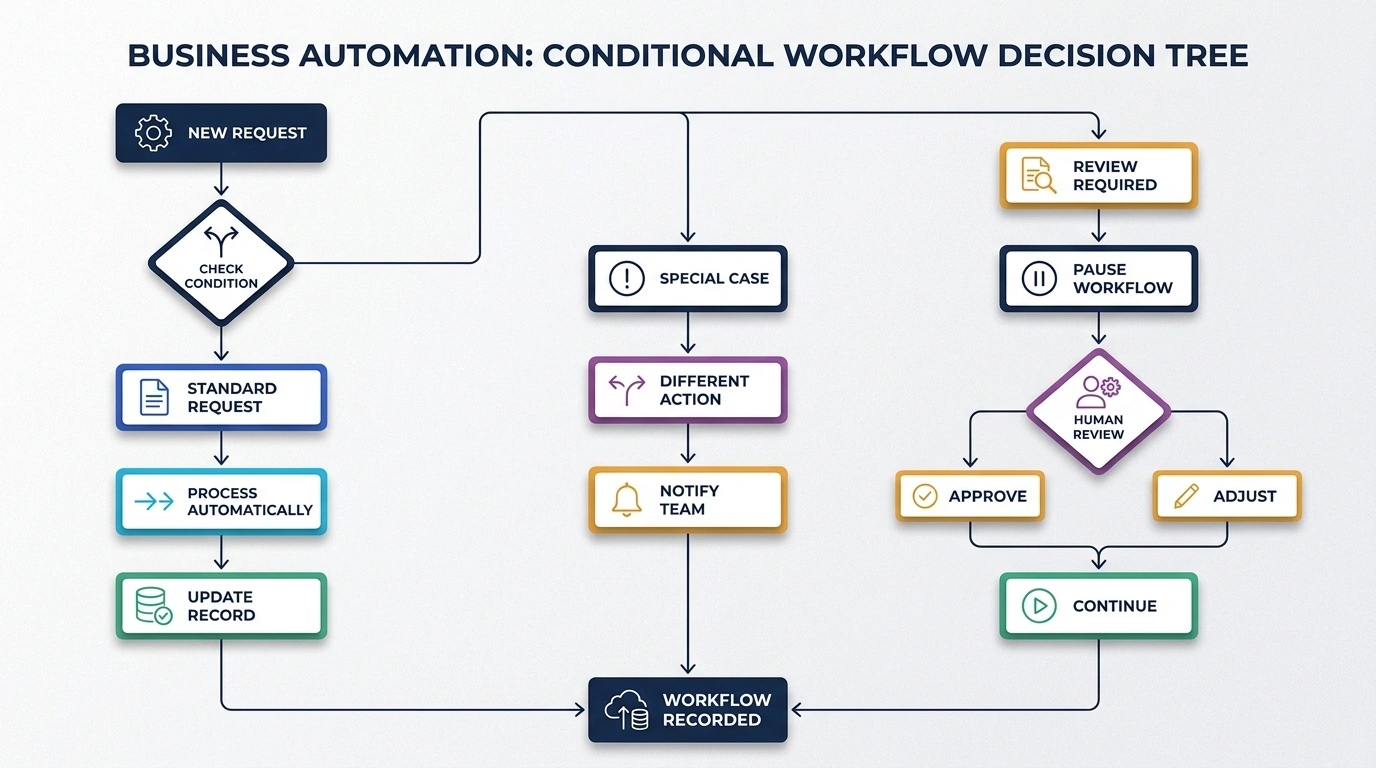
Standard requests can trigger direct system updates, custom enquiries can route to designated team members, and high-value or unusual requests can pause for human approval.
Human Control
Sensitive actions and exceptions can pause for staff review before execution resumes.
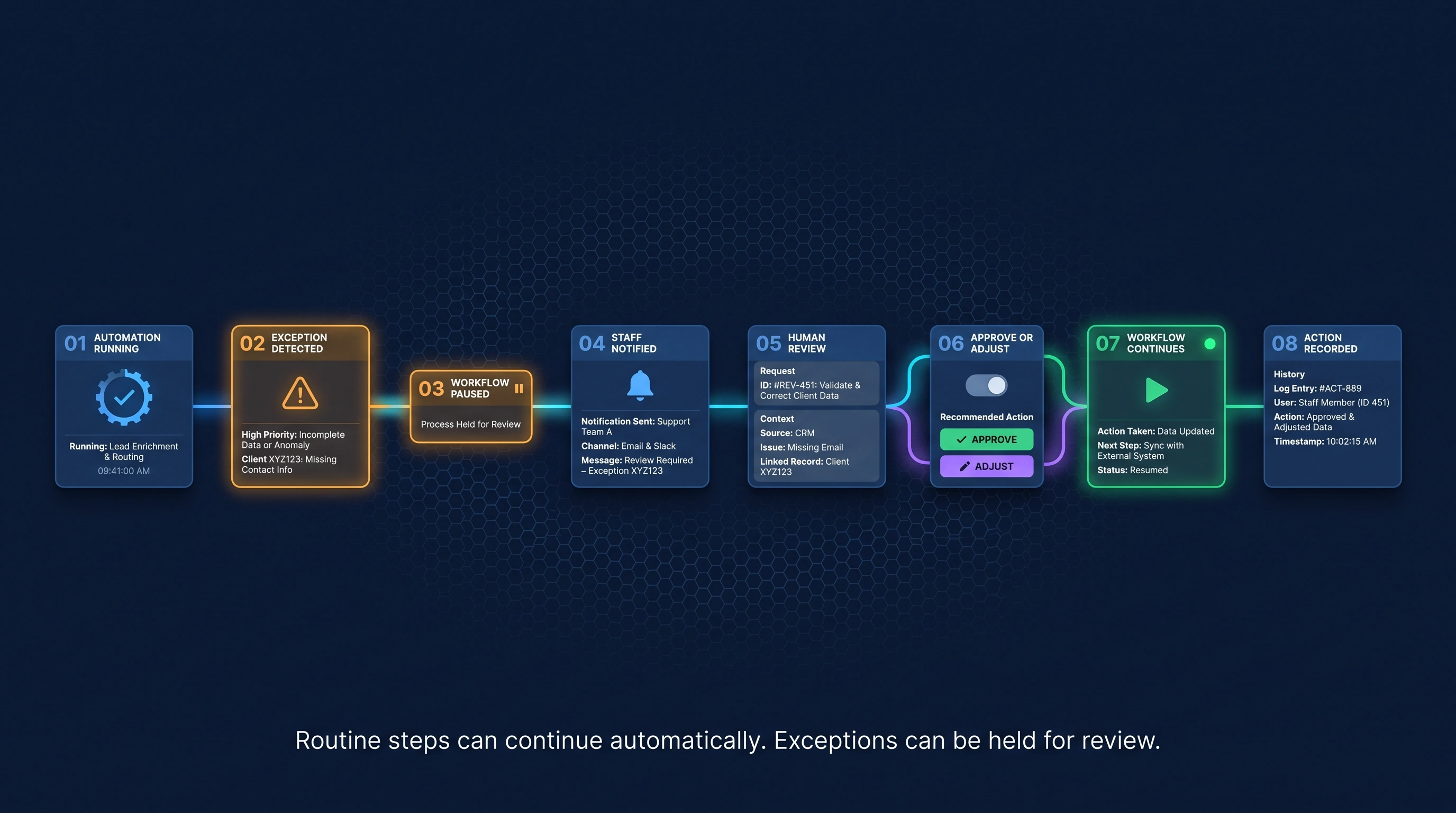
Automation handles repetitive routine steps. When an exception occurs or sensitive thresholds are exceeded, the workflow can alert staff, present relevant context, and resume only after approval.
Development Timeline
A structured development methodology from workflow discovery and process mapping to testing, exception handling, and refinement.
Clarify repeatable tasks, system inputs, operational friction, and business goals.
Map triggers, actions, conditions, exception paths, and responsible human review steps.
Define workflow states, data movement, supported connections, logging, and fallback behavior.
Build compatible API, webhook, CRM, database, and messaging connections included in scope.
Configure deterministic rules and suitable AI-assisted classification or summarization.
Validate standard paths, failures, retries, review queues, permissions, and data handling.
Deploy the approved workflow, monitor practical use, and refine agreed rules and connections.
System Reliability
Business automation needs practical controls for connected actions, exceptions, access, and operational visibility.
Access and approval responsibilities can reflect agreed staff roles.
Incoming payloads can be checked before connected actions proceed.
Supported connections use suitable credentials and transport controls.
Reliable endpoints and structured payload handling support agreed connections.
Execution history and action trails can remain available where included.
Exceptions can follow agreed fallback, alert, or review paths.
Suitable temporary failures can use bounded retry behavior where appropriate.
Sensitive or unusual actions can wait for authorized review.
Architecture is prepared for compatible systems included in scope.
Teams can review execution status, outcomes, and held items where included.
System Connectivity
AI Business Automation can act as an orchestration layer between supported sources and systems.
Available connections depend on project requirements, supported platforms, and access provided.
Practical Value
Visualizing the practical operational difference custom automation can make to daily work.
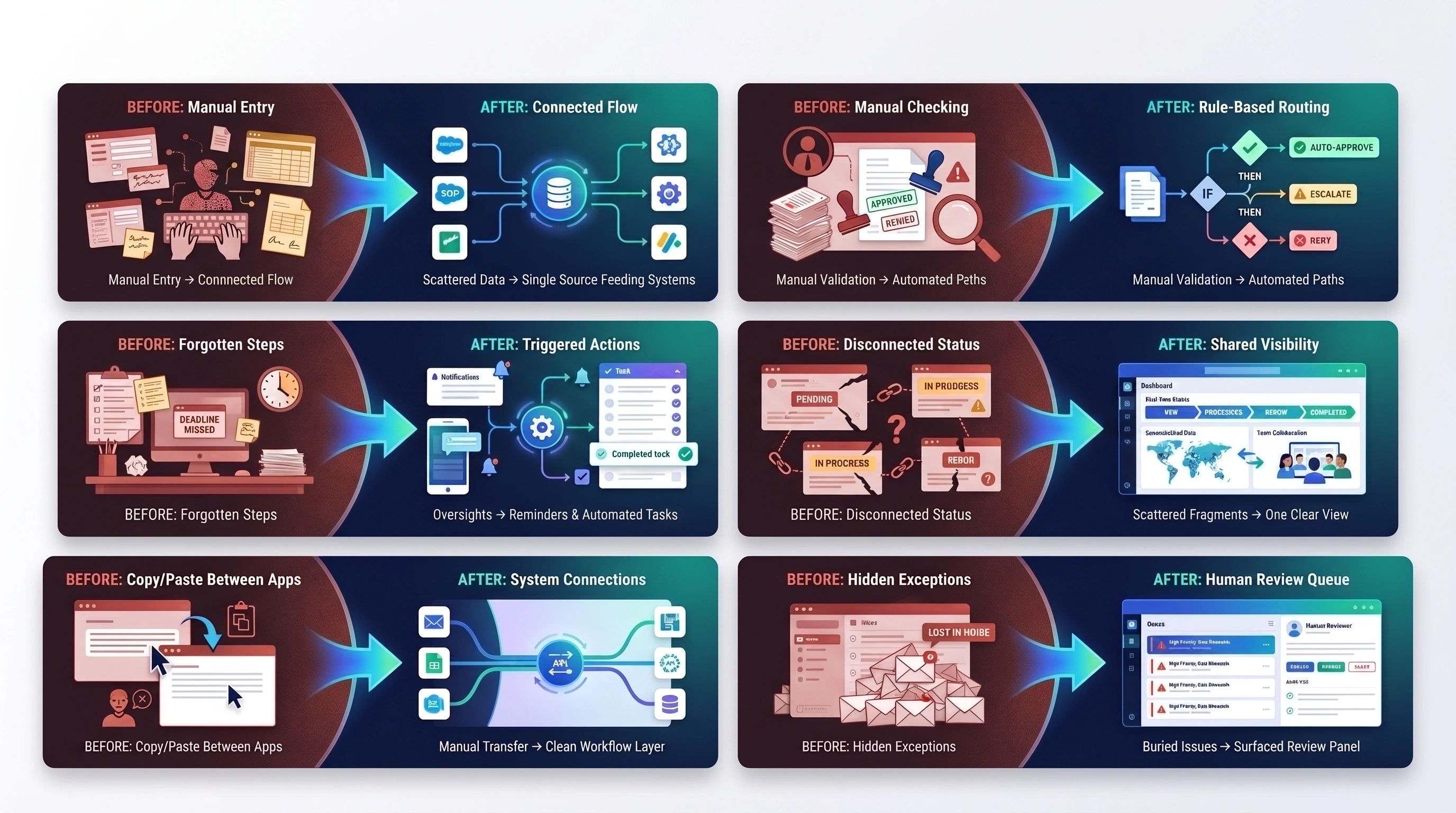
From: Repeated manual data entry
↓To: Connected information flow
From: Manual request checking
↓To: Rule-based routing
From: Forgotten next steps
↓To: Triggered actions
From: Disconnected status
↓To: Shared workflow visibility
From: Manual copy/paste between apps
↓To: Supported system connections
From: Exceptions hidden in routine work
↓To: Clear human-review queue
Complementary Capabilities
Explore other ASFIT services that can complement a structured automation workflow.
Questions & Answers
AI Business Automation combines agreed triggers, data handling, business rules, AI-assisted processing where useful, supported system actions, and human review to move repetitive work through a structured workflow.
Suitable tasks can include form processing, email classification, CRM updates, data routing, notifications, task creation, document handling, and approval steps, depending on the systems and agreed scope.
No. The goal is to reduce repetitive handling while keeping staff responsible for sensitive decisions, unusual cases, approvals, and work that needs human judgment.
Yes, where the systems provide suitable access, APIs, webhooks, or other supported connection methods. Compatibility and data ownership are reviewed before implementation.
AI-assisted classification, extraction, or summarization can be included where it is useful and appropriate. Deterministic business rules can continue to control system actions and approval boundaries.
The agreed workflow can log the issue, retry a suitable step, use a fallback path, notify staff, or place the item in an exception queue for review.
Yes. Sensitive actions, unusual values, or selected thresholds can pause for authorized staff approval before the workflow continues.
Existing website forms, CRM records, or supported business data may be used after ASFIT reviews access, structure, data quality, permissions, and technical compatibility.
A workflow can be extended with additional supported triggers, actions, rules, or connections when the architecture and project scope allow.
Share which tasks your team repeats, which systems are involved, what rules determine the next step, and where staff approval is needed. ASFIT will review the process and recommend a practical scope.
Start Your Automation Project
Tell ASFIT Solutions which tasks your team repeats, which systems are involved, and where the workflow slows down. We can review the process and identify practical opportunities for structured automation.


